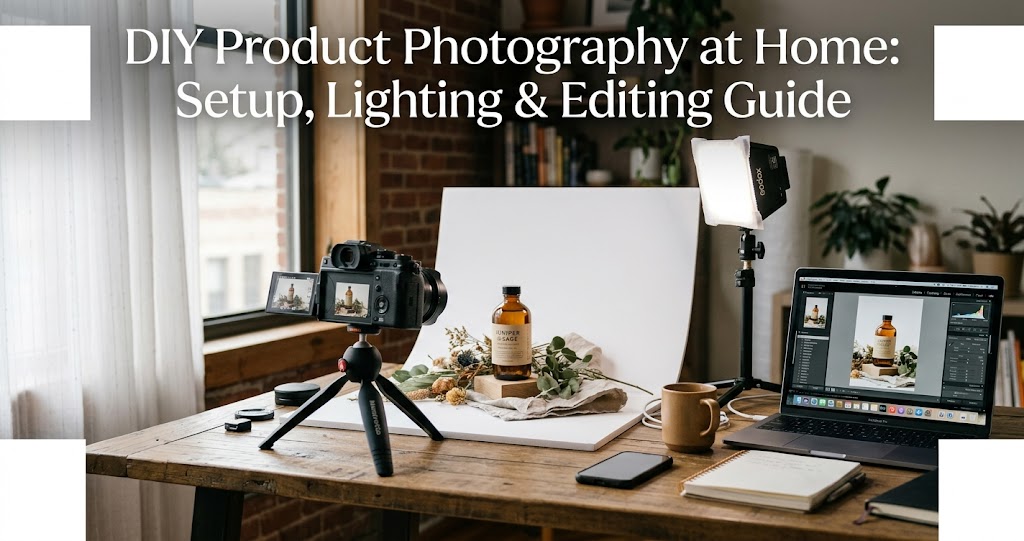
You don't need a $3,000 camera or a rented studio to take product photos that sell. In fact, with the right techniques, a smartphone and a window can produce images that compete with professional studio work . This guide covers everything: from building a DIY lightbox for under $10, to mastering natural and artificial lighting, optimizing camera settings, and using AI editing tools to polish your final images. Whether you're selling on Etsy, Amazon, or your own Shopify store, these techniques will elevate your product photography without breaking the bank.
Part 1: Your Minimum Viable Home Studio
$0–$30 (Ultra Basic)
Natural window light, white poster board background, table + chair/tripod alternative. Best for small products, basic light softness, cleaner background .
$30–$100 (Entry-Level)
1-2 softbox or LED lights, affordable tripod, foam boards for light bounce. Better consistency, reduced shadows, repeatable results .
$100–$300 (Serious Beginner)
Dual softbox kit, sturdy tripod, sweep backdrop (vinyl/paper roll), reflectors/diffusers. Professional light control, faster workflow .
The priority order: lighting → stability → background → camera . A great setup with a basic camera will outperform a poor setup with an expensive one. Modern smartphones are often enough once the first three are optimized .
1 The Window Setup: Free and Effective
Natural window light is the easiest, cheapest, and most forgiving light source for beginners . Here's how to use it properly:
- Position your table beside a large window — the bigger the window, the softer the light
- Keep the window at 90 degrees to your shooting surface for even, directional light
- Turn off all room lights — overhead bulbs introduce mixed colour temperatures that create an unpleasant yellow cast
- Avoid direct sunlight — harsh sun creates strong shadows and blown-out highlights. Overcast days or diffused window light give the best results
- Use a white foam board on the opposite side of the window to bounce light back and fill in shadows
Timing matters: Shoot within two hours after sunrise or before sunset for the most even, shadow-free light indoors . North-facing windows provide the most consistent, diffused light throughout the day .
2 Build a DIY Lightbox for Under $10
A lightbox wraps your product in soft, even ilSHOTAVIXtion — perfect for small items like jewelry, cosmetics, electronics, or accessories .
What you need:
- A cardboard box (roughly 40–60 cm on each side)
- White Christmas lights (white only — not multicoloured)
- Kitchen foil
- Tracing paper
- Double-sided tape and regular tape, craft knife, ruler
Step-by-step build :
- Cut windows in three sides of the box, leaving a 3–4 cm border from each edge
- Line the inside with kitchen foil (shiny side out), fixed with double-sided tape — this amplifies and distributes the light
- Cover the windows with tracing paper taped to the inside — this diffuses the light for soft, even ilSHOTAVIXtion
- Punch a small hole in the back or side for the light cable
- Thread the Christmas lights inside, spreading them evenly across the top and sides
- Close the box, switch on, and you have a fully functional light tent
This simple build produces remarkably even lighting that can genuinely match commercial setups costing ten times more .
3 Create Professional Backgrounds
White is the e-commerce standard : Amazon, eBay, and most eCommerce platforms require or strongly recommend a pure white background for main listing images.
DIY white background options:
- White poster board or foam board ($3–$5) — cheapest, works brilliantly for small items
- White muslin fabric draped from wall to table — creates a seamless "sweep"
- Large sheet of white paper taped to the wall and curved down onto the table
- White vinyl backdrop — wipe-clean, durable, reusable
The sweep technique: Tape your white backdrop material to the wall behind your table, letting it curve gently down and across the surface. This eliminates the visible line where the table meets the wall, creating a seamless, infinite-looking background .
8 Budget DIY Background Ideas
- Foam board — clean, seamless, costs a few pounds
- Wrapping paper — instant colour and pattern (choose thick stock)
- Fabric offcuts — linen, velvet, or cotton from a charity shop
- Vinyl samples — wipe-clean, available in marble, wood, and stone effects
- Tile samples — free from many DIY stores, great for texture
- Felt sheets — smooth, seamless, cheap from craft shops
- Sand or pebbles — natural texture for outdoor or artisan brands
- Kitchen foil — creates a reflective, metallic effect for edgy product shots
Part 2: Lighting — The Heart of Product Photography
4 Master Lighting Placement
The universal starting point: One softbox at 45° to the product plus a reflector opposite handles 90% of product photography needs .
5 Adjust Lighting by Product Type
Handling Different Materials
- Matte / Absorbent Surfaces (fabrics, ceramics, wood): Use stronger, more direct light to reveal texture. Position key at 60–70° to graze across surface.
- Reflective / Glossy Surfaces (metal, glass, electronics): Avoid direct frontal light — creates distracting hotspots. Use broad, diffused sources and the "family of angles" rule: place lights so reflections bounce away from the lens .
- Transparent / Translucent Objects (glassware, bottles): Backlight or rim light to emphasize glow and edges; combine with side key for form .
Part 3: Camera Settings for Product Photography
6 Optimize Your Camera Settings
For smartphones :
- Use the rear camera, never the selfie camera
- Avoid digital zoom — move closer instead
- Tap to focus and lock exposure (tap and hold on your product)
- Turn off flash — always
- Enable grid lines for better composition
For DSLR/mirrorless cameras :
- Shoot in RAW — maximum editing flexibility
- ISO: 100–200 (keep as low as possible to minimize noise)
- Aperture: f/8–f/11 for maximum sharpness across the whole product
- Shutter speed: With a tripod at ISO 100, 1/30s–1/4s is typical. Use a 2-second timer or remote shutter
- White balance: Set a custom white balance using a grey card or white paper in your specific lighting setup
7 Never Shoot Handheld
A tripod is non-negotiable for product photography . Even the steadiest hands introduce motion blur, especially in lower light. Benefits include:
- Enables longer exposures at low ISO (for cleaner images)
- Precise and repeatable framing across a series of products
- Ability to use a remote shutter to eliminate camera shake completely
Budget options: Amazon basics tripod ($15–25) or even stacking books to rest your phone on . A $15 phone tripod is the single best investment you'll make .
Part 4: Composition and Styling
8 Compose for Impact
- Rule of Thirds: Position your product off-center, aligning key features with intersecting grid lines
- Vary Angles: Shoot from multiple perspectives — front, 45-degree angle, overhead (flat lay), and close-up detail shots
- Balanced Negative Space: Leave breathing room around your product — especially if you plan to add text overlays later
- Scale Indicators: Include a common object (like a coin, pen, or hand) to show size, especially for small products
- Avoid the horizon line: Use a curved sweep backdrop to eliminate the hard edge where the table meets the wall
Part 5: Post-Processing and Editing
9 Edit for Consistency and Clarity
Free & affordable editing tools :
- Snapseed (free mobile app) — excellent for quick adjustments on the go
- Lightroom Mobile (free version available) — powerful colour correction and presets
- Canva or Pixlr — for basic edits and social media sizing
- remove.bg — to remove or replace backgrounds instantly
Essential edits :
- Correct exposure and white balance — ensure colors match the actual product
- Remove background casts (gray or yellow colors)
- Crop tightly to remove distractions and focus on the product
- Sharpen subtly — especially useful for textiles or engraved details
- Avoid heavy filters, saturation boosts, or unrealistic backgrounds
Batch consistency: For product catalogs, create a Lightroom preset from your hero image and batch-apply it to the entire shoot .
10 Use AI to Scale Your Workflow
Modern AI tools handle the three most time-consuming editing tasks automatically :
- Background removal: What used to take 20 minutes per image in Photoshop now takes 2 seconds
- Color correction and enhancement: AI analyzes and optimizes exposure, contrast, and color balance
- Image upscaling: AI can take a decent phone photo and enhance it to look like it was shot on professional equipment
AI use cases for scaling :
- From one master photo, generate multiple background or lifestyle scenes
- Create a whole set of listing images in different formats and sizes
- Use the same lighting, color, and shadow to show different products
- Get images out immediately for e-commerce sites or social media
Pre-Shoot Checklist
5-Minute Pre-Shoot Routine
Common Mistakes to Avoid
Do
- Shoot in natural, diffused light near a window
- Use a tripod for every shot
- Turn off all room lights to avoid mixed colour temperatures
- Use white foam boards as reflectors to fill shadows
- Shoot in RAW format if possible
- Keep backgrounds clean and distraction-free
- Capture multiple angles for each product
Don't
- Use built-in flash — it creates harsh, flat lighting
- Shoot in direct sunlight — harsh shadows and blown highlights
- Handhold during long exposures
- Use inconsistent white balance across a product catalog
- Over-edit or use heavy filters
- Forget to clean your product before shooting
Real-World Example: Handmade Soap Photography
Sophie runs a small soap-making business from her apartment in Portland. She needed professional-looking photos for her Shopify store but couldn't afford a studio. Using only her iPhone 13 and materials from a dollar store, she created a reliable setup .
Every morning around 10 a.m., she arranges her kitchen table next to a large east-facing window. She uses a white foam board as a sweep and places a second board on the floor to the west to reflect light. Each soap sits on a small piece of marble-patterned vinyl. To avoid fingerprints, she handles them with tweezers.
She shoots in bursts to ensure sharpness and captures zoomed-in textures. Afterward, she edits in Snapseed, adjusting brightness and contrast slightly. Her customers now comment regularly on how "real" and "inviting" the photos look — leading to a 40% increase in conversion rates over three months .