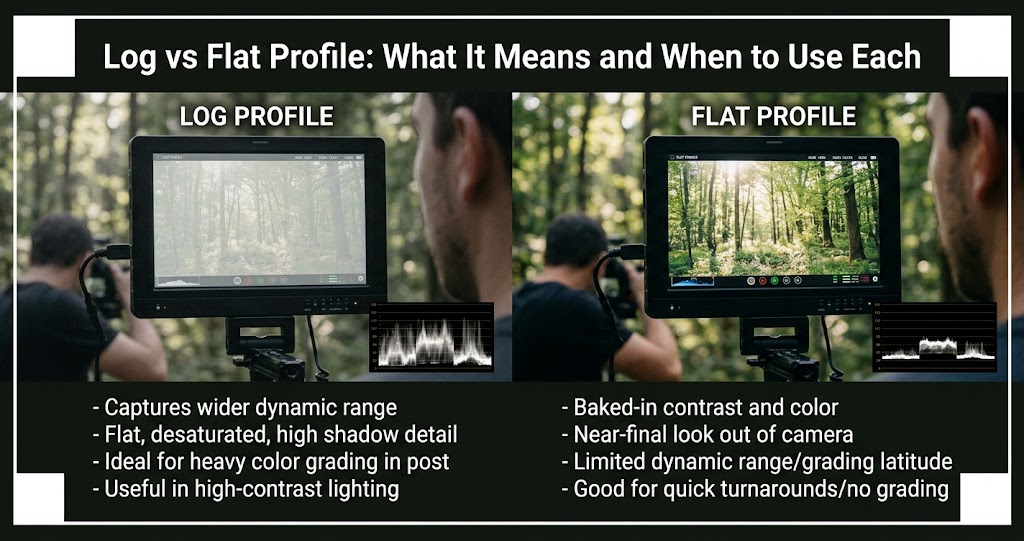
You've seen the terms "log" and "flat" in camera menus, but what do they actually mean? And when should you use them? In 2026, log profiles like C-Log, S-Log, N-Log, and V-Log have become standard features even on mid-range cameras. But shooting log without understanding when and why can lead to flat, lifeless footage that's harder to grade than a standard profile .
This guide explains everything: what log profiles actually do, how they differ from flat profiles, which cameras support which logs, and — most importantly — when you should use each one. Whether you're shooting video or stills, you'll learn how to choose the right profile for your workflow.
What Is a Picture Profile?
A picture profile is a preset that determines how your camera processes colors, contrast, saturation, and sharpness before saving the image or video. Standard profiles (like Standard, Vivid, or Portrait) apply significant contrast and saturation for a finished look straight out of camera .
Log and flat profiles are different — they're designed to preserve maximum image data at the expense of looking good straight out of camera .
Common Log Profiles by Brand (2026)
Log vs Flat: What's the Difference?
1 The Technical Difference
Log profiles use a mathematical logarithmic curve to compress highlights and raise shadows, preserving maximum dynamic range. They're designed specifically for color grading and have a known technical specification (gamma curve, color space, and sometimes LUTs provided by the manufacturer) .
Flat profiles (sometimes called Neutral, Natural, or Cine-like) simply reduce contrast and saturation without the mathematical precision of a log curve. They're a middle ground between standard profiles and log — more grading flexibility than standard, but less dynamic range than true log .
Log Profile
- Maximizes dynamic range (14-16 stops)
- Requires grading/LUTs to look natural
- Industry standard for cinema
- More latitude for color correction
- Larger file sizes
Flat Profile
- Moderate dynamic range (10-12 stops)
- Easier to grade than log
- Good for quick-turnaround projects
- Less risk of grading mistakes
- Not suitable for heavy color grading
When to Use Log Profiles
2 Use Log for High-End Video Production
Log is the industry standard for professional video. You should use log when:
- You're shooting in high-contrast scenes with bright skies and dark shadows
- You plan to color grade in post-production using professional tools like DaVinci Resolve
- You need to match footage across multiple cameras (log gives a consistent starting point)
- You're delivering for broadcast, cinema, or high-end commercial work
- You have the time and expertise to grade properly
2026 update: Nikon's acquisition of RED has brought RED LUTs to N-Log footage, making it easier to achieve a filmic look directly from Z series cameras . Canon's C-Log 2 offers up to 16 stops of dynamic range, rivaling ARRI. Sony's S-Log3 with S-Gamut3.Cine is the most widely supported log profile among third-party LUT creators .
3 Using Log for Photography
Some photographers shoot in log for stills, but it's less common than in video. The benefits:
- Maximum dynamic range capture in a single shot
- More flexibility for extreme color grading
- Better highlight and shadow recovery
The downside: RAW files already capture maximum dynamic range. For most photographers, shooting RAW + a standard profile gives you the best of both worlds — a usable JPEG and a RAW file for extensive editing . Only shoot log for stills if your camera doesn't have RAW (some cameras shoot log video but not RAW) or if you're delivering video-first content and want consistent color.
When to Use Flat Profiles
4 Use Flat for Quick-Turnaround Video
Flat profiles are ideal for:
- YouTube and social media content where you need to edit and upload quickly
- Event videography (weddings, corporate events) with tight deadlines
- When your camera doesn't have a true log profile
- When you're learning color grading and log feels intimidating
- Shooting in controlled lighting where dynamic range isn't extreme
5 Flat Profiles for Photography
For photography, flat profiles can be useful when:
- You're shooting JPEG and want more editing flexibility
- Your camera doesn't have RAW
- You're shooting tethered and want a neutral preview
However, if your camera shoots RAW, the profile you choose doesn't affect the RAW data — only the JPEG preview. Shoot RAW + JPEG with a neutral/flat profile to get the best of both worlds .
Canon C-Log: A 2026 Update
6 C-Log 1, 2, and 3 Explained
Canon offers three log profiles on its cinema and mirrorless cameras:
- C-Log 1: Oldest, simplest, easiest to grade. Good for beginners.
- C-Log 2: Extended highlight and shadow range (up to 16 stops). Ideal for high-contrast scenes but more challenging to grade.
- C-Log 3: The sweet spot. Retains the dynamic range of C-Log 2 but with a grade closer to C-Log 1. The 2026 firmware updates on R5 Mark II and R6 Mark II have made C-Log 3 the standard recommendation .
Sony S-Log: The Industry Standard
7 S-Log2 vs S-Log3
Sony offers two log profiles on its Alpha and Cinema Line cameras:
- S-Log2: Older, steeper curve, can be harder to grade. Best for very high-contrast scenes.
- S-Log3: Smoother curve, easier to grade, more forgiving. The professional standard.
S-Gamut3.Cine is the recommended color space to pair with S-Log3. It's designed to match the color space of cinema cameras, making it easier to match Sony mirrorless footage with Venice or FX series cameras .
Nikon N-Log: The RED Advantage
8 N-Log and RED LUTs
Nikon's acquisition of RED in 2025 has begun showing results. The Z6 III and Z8 now include RED LUTs (Look-Up Tables) designed for N-Log footage, allowing you to apply a filmic look directly in-camera or in post .
How to Grade Log and Flat Footage
9 The Log Grading Workflow
Step 1 — Apply a conversion LUT: Start by applying your camera manufacturer's official conversion LUT (e.g., Canon Log 3 to Rec.709). This brings your footage into a standard color space .
Step 2 — Correct exposure and white balance: Use your editing software's controls to adjust exposure, contrast, and white balance.
Step 3 — Apply creative grade: Add your creative LUTs or manual adjustments (curves, saturation, color wheels).
Step 4 — Secondary corrections: Use masks and qualifiers to adjust specific areas (skin tones, skies).
10 The Flat Profile Workflow
Grading flat footage is simpler than log:
- Add contrast using the curves or contrast slider
- Adjust saturation to taste (flat profiles are often desaturated)
- Apply a subtle creative LUT if desired
- Less risk of introducing artifacts or banding
Exposing Log Correctly
11 Expose to the Right (ETTR)
Log profiles are designed to preserve highlight detail. The general rule: expose log footage 1-2 stops brighter than a standard profile .
Canon C-Log 3: Expose skin tones to 55-60% IRE. Sony S-Log3: Expose skin tones to 60-65% IRE. Nikon N-Log: Expose skin tones to 60-70% IRE .
When NOT to Use Log
Avoid Log When
- You're delivering directly to clients without grading
- You're shooting 8-bit video (log needs 10-bit to avoid banding)
- You're in extremely low light (log amplifies noise)
- You're a beginner still learning exposure
- You need quick turnaround with minimal editing