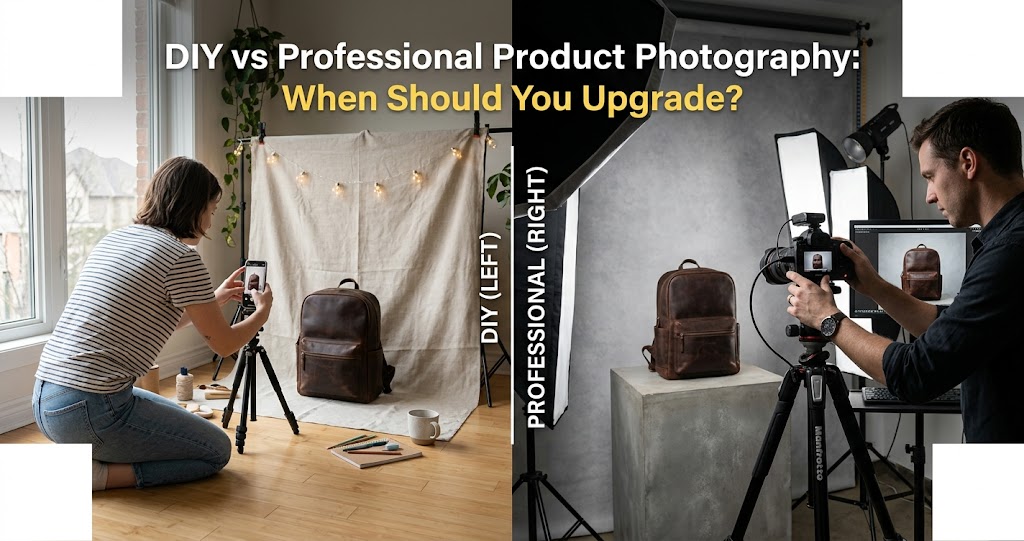
DIY product photography has never been more accessible. A modern smartphone, window light, a cheap tripod, and a clean background can get a small brand surprisingly far. For testing a new product, launching an Etsy store, or creating quick social content, a simple home setup can be more than enough.
But there is a point where DIY photography starts to cost more than it saves — not just in time, but in missed conversions, inconsistent branding, and lost customer trust. The issue is rarely image quality in isolation. It is consistency, speed, and whether your product images can hold up across your website, marketplace listings, social ads, email campaigns, and printed material.
So when should you keep shooting in-house, and when should you bring in a professional? Here's how to think through it.
In This Article
📱 When DIY Product Photography Works
DIY Works Best at the Testing Stage
DIY is most useful when speed matters more than polish. If you are validating a product idea, testing new packaging, creating behind-the-scenes content, or listing a small batch of handmade items, you probably do not need a full commercial shoot yet.
A simple home setup can work well if you control the basics:
Your DIY Essentials
- Soft, even window light
- Clean, neutral background
- Tripod or stable surface
- Consistent camera angle
- Accurate colour reproduction
- Basic retouching in Lightroom or Snapseed
- Enough detail shots to answer buyer questions
DIY Struggles With
- Reflective or transparent products
- Large product catalogues
- Consistent colour across many items
- Complex lifestyle setups
- Tight marketplace crop requirements
- Packshots with precise shadow control
- High-stakes launch campaigns
DIY is also genuinely valuable for informal content. Stories, reels, packing videos, workbench updates, and quick product teasers often perform better when they feel less polished — the rawness is part of the appeal. A founder packing orders on their kitchen table can outperform a slick studio shot on Instagram Stories.
⚠️ Where DIY Starts to Break Down
The Catalogue Problem
DIY photography usually fails when your product range grows. One or two products are manageable. Twenty products — each needing a hero image, detail shots, packaging shots, lifestyle images, social crops, and marketplace files — is a completely different job.
The most common problems that appear at scale:
- Inconsistent lighting between products shot on different days
- Slightly different background tones across the catalogue
- Colours that do not match the actual product (especially reds and blues)
- Unwanted reflections on glossy packaging or bottles
- Crooked or mismatched angles across the product range
- Images that look fine on Instagram but feel weak on product pages
- Files that are too large, too small, or cropped incorrectly for different platforms
- Costly re-shoots because the original setup was not documented
This is the inflection point where product photography stops being "taking pictures" and becomes a production system — one that requires consistent lighting setups, documented settings, professional retouching, and platform-specific exports. That is exactly what a professional photographer is trained to deliver.
🎯 What Professional Photography Actually Gives You
It's About Repeatability, Not Just Better Gear
A professional product shoot is not simply about having better equipment. It is about control — and more importantly, repeatability. A commercial product photographer thinks about how the full image set works together across every platform it will appear on.
That includes lighting consistency, product styling, composition planning, retouching standards, export formats, and a clear understanding of where each image will be used — whether that's a Shopify product page, an Amazon listing, a full-page magazine ad, or a social media campaign.
What a Professional Product Image System Delivers
For ecommerce brands, visual consistency directly affects conversion. If one product image looks premium and the next looks improvised, trust drops — and with it, the likelihood of a purchase. Brands looking for professional product photography in Perth often need more than a few attractive images. They need a complete visual system that works across ecommerce, launch campaigns, social media, and web design without having to rebuild the look every time a new product launches.
🚀 When Should You Upgrade from DIY?
Upgrade When the Business Case Is There
You do not need to upgrade just because professional photography looks better in theory. The right time to invest is when your current images are actively holding your business back. Here are the clearest signals that it's time:
Your products are already selling well and need stronger visual presentation to scale
You are launching a larger catalogue and consistency is becoming impossible to maintain in-house
Your current photos look inconsistent — different tones, angles, or lighting from product to product
Your website looks less premium than the actual product you are selling
You are running or planning paid ads, where image quality directly affects click-through and return on spend
You need images for wholesale buyers, retailers, or stockists who expect professional-grade assets
You are preparing for a major product launch, press coverage, or crowdfunding campaign
Your products are reflective, transparent, textured, or otherwise hard to light without professional equipment
You are spending too many hours shooting and editing in-house — hours that should be going into the business
Your return rate is being affected by product images that do not accurately represent what customers receive
🔄 The Hybrid Approach Often Works Best
DIY and Professional Together
For many small and growing brands, the right answer is not an either/or choice. It is a deliberate mix — professional photography for the assets that need to perform commercially, and DIY for the content that benefits from feeling human and unpolished.
Shoot Professionally
- Website hero images
- Product page galleries
- Marketplace listings (Amazon, Etsy)
- Paid ad creative
- Launch campaign visuals
- Packaging and wholesale material
- Press kit assets
Shoot DIY
- Behind-the-scenes posts
- Founder updates and day-in-the-life
- Packing orders content
- Quick product demos or unboxing
- Instagram Stories and casual reels
- Work-in-progress shots
- Community and UGC-style content
This approach gives you a polished core image library for the channels where visual quality drives conversion, without making every single piece of content slow or expensive to produce. Many of the most successful product brands operate exactly this way — studio-quality on the website, raw and real on social.
📋 How to Prepare for a Professional Shoot
Preparation Makes the Difference
If you decide to book a professional product photographer, the preparation you do beforehand has a direct impact on the quality and quantity of images you walk away with. A well-prepared client gets more from their shoot time than an unprepared one — every time.
Before your shoot, get clear on the following:
Pre-Shoot Checklist
Clean every product carefully before the shoot. Remove fingerprints, dust, and any damaged packaging — these issues are visible in close-up photography and time-consuming to retouch. Bring backup units of key products in case of scuffs or damage during the session.
Final Thoughts
DIY product photography is not amateur by default. Used in the right context, it is fast, flexible, and perfectly suited to early-stage content and social-first channels. A founder with good instincts and a decent setup can produce genuinely impressive results — especially for the informal, behind-the-scenes content that audiences respond to today.
But once your product images start affecting conversion rates, brand perception, ad performance, and customer trust at scale, professional photography stops being a creative expense and starts becoming a sales asset. The question is no longer whether professional images look better. It is whether your current images are doing the job you need them to do.
Start simple. Learn what you can with what you have. Then upgrade the images that carry the commercial weight — and let the rest stay human.